


What you need
- A PayPal Business account for live donations
- A REST API app of type Merchant on developer.paypal.com
- The app’s Client ID and Secret
Step 1: Get your credentials from PayPal
- Go to developer.paypal.com, sign in with your PayPal account and open Apps & Credentials.
- Pick the environment at the top: Sandbox to test with PayPal’s test accounts, Live for real donations.
- Create a REST API app and choose the type Merchant (not Platform).
- Open the app and copy its Client ID and Secret.
Step 2: Paste them into GivePilot
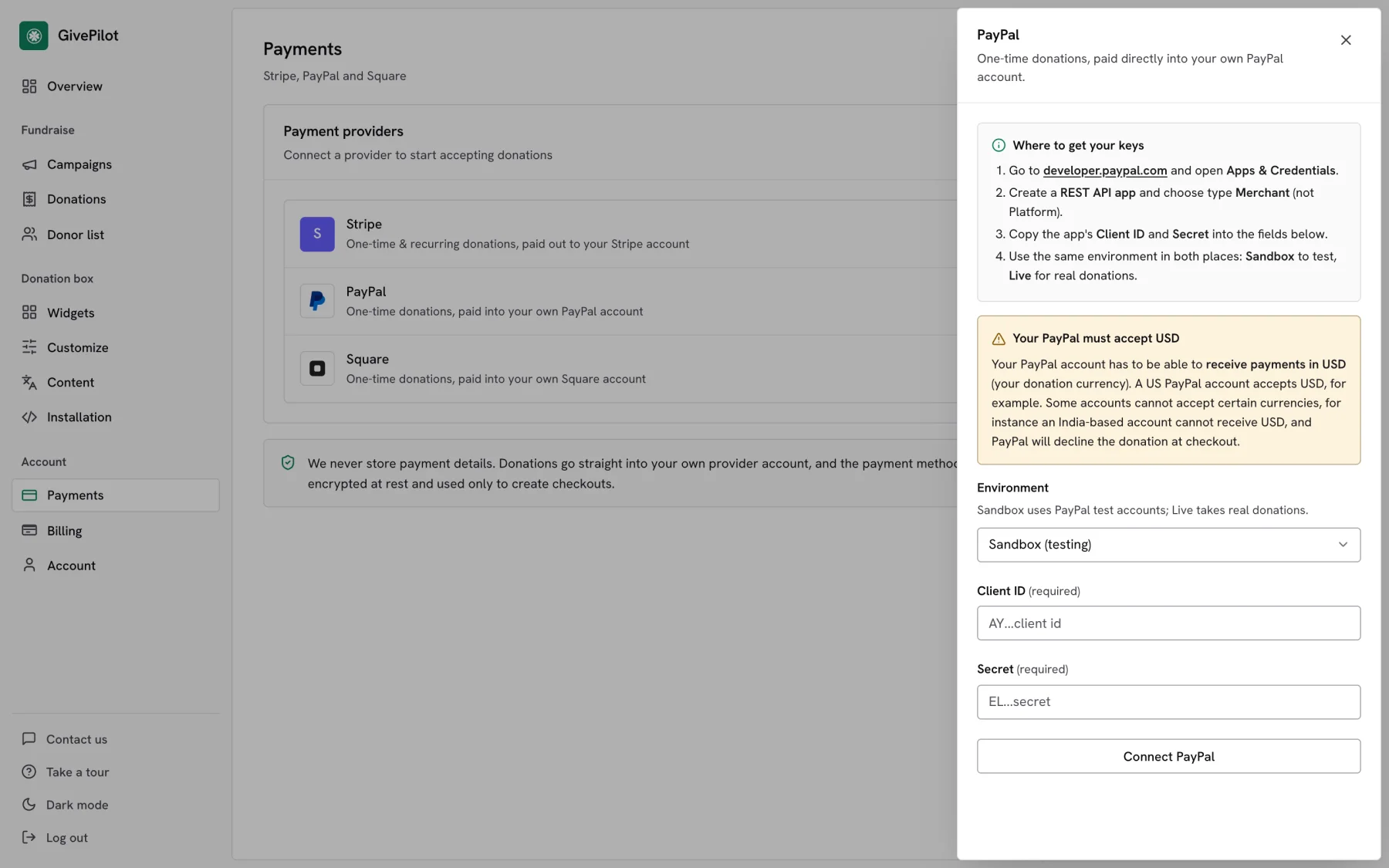
- In your GivePilot console, open Payments and press Connect next to PayPal.
- Set Environment to the same one you used on PayPal: Sandbox or Live.
- Paste the Client ID and the Secret.
- Press Connect PayPal. A Donate with PayPal button now appears in your box for one-time gifts.
Step 3: Take a test donation
Donors who press the PayPal button approve the gift on PayPal and come back to your site. The donation lands in your PayPal balance and in your GivePilot console, and the donor gets their receipt.
Open the page with your donation box, give a small test gift and check that it appears in Donations in your console with its receipt. Then switch to live credentials if you started in test mode.
Tips
Your PayPal must accept your currencyYour PayPal account has to be able to receive payments in your donation currency. A US account accepts USD, for example, while some accounts cannot accept certain currencies; an India-based account cannot receive USD. PayPal declines the donation at checkout when the currency is not accepted.
Match the environment in both placesSandbox credentials only work with Sandbox selected in GivePilot, and Live credentials only with Live. A mismatch is the most common reason a connection fails.
Ask PayPal about charity ratesPayPal offers a discounted transaction rate to confirmed charities. In the US it is listed on PayPal’s merchant fees page under charitable organizations.
Common questions
Can donors give monthly with PayPal?
PayPal in GivePilot handles one-time donations. When a donor chooses a recurring gift, the box hides the PayPal button and the gift runs through Stripe.
Do I need Stripe as well?
No. PayPal on its own is enough to take one-time donations. Add Stripe if you want card payments without a PayPal login, or recurring giving.
Why choose Merchant and not Platform?
A Merchant app takes payments into your own account, which is exactly what GivePilot needs. Platform apps are for marketplaces that pay other sellers.
Is my Secret safe?
Your credentials are encrypted at rest and used only to create PayPal checkouts. Donors approve payments on PayPal itself.